Controls: PC and Mobile
Part 2 of 8
There isn't much to the controls in Endless Curse: every skill casts itself, basic attack included. All you do is move, and when your Fury is full, unleash your ultimate. Here are the full controls for PC and mobile, plus what everything on screen means.
01PC controls
| Action | Key |
|---|---|
| Move | W A S D or the arrow keys |
| Unleash your ultimate (Fury) | R or Space, only when Fury is full |
| Pause / resume | Esc or P |
| Pick a card on level up | 1 2 3 (numpad works too) |
| Reroll on level up | R |
| Talk or use a building in town | E or Enter |
| Leave in town | Esc: first closes any open window, press again for the main menu |
| Dialogue: next line | Space, Enter or E |
| Dialogue: choose an option | Arrow keys to move, Space to confirm, or press the number next to the option |
There are no skill keys: your basic attack and all four skill slots fire on their own. Gamepads aren't supported yet.
02Phones and tablets
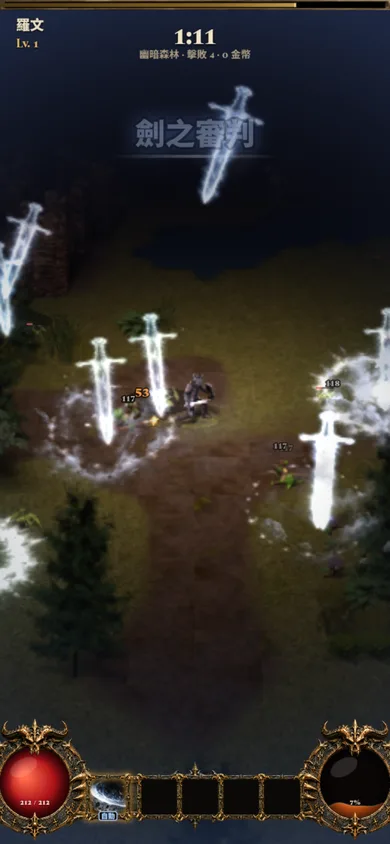
- Move: put your finger anywhere on the screen and the joystick appears right there. Drag past its edge and the joystick base follows your finger.
- Ultimate: once Fury is full, tap the Fury orb in the bottom right.
- Pause: the pause button in the top right.
- Joystick size: Settings → Controls lets you pick small, normal or large.
- Play in portrait: on small phones, turning to landscape pauses the game and asks you to turn back. In full screen, the game tries to lock portrait mode.
03What's on screen
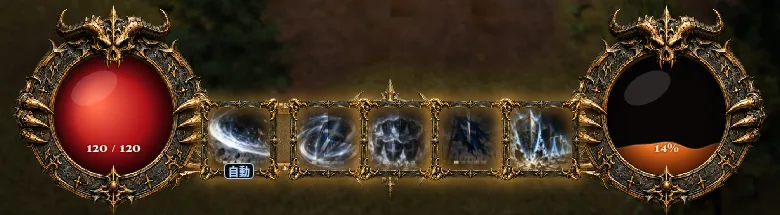
- Red orb on the left: current HP / max HP. Hit zero and you lose.
- Five slots in the middle: the first is your basic attack, the other four are the skills you learn as you level up.
- Fury orb on the right: fill it to 100% to unleash your ultimate.
- Top of the screen: time, stage name, kills and coins. When a boss appears, a boss health bar shows up too.
- Objective box: during the prologue and story chapters, the top of the screen shows what to do next.
04Fury and your ultimate
Fury fills from 0 to 100:
- Killing monsters: regular monster +1, elite +6, boss +30.
- Taking damage: +7 for every 10% of max HP lost, at least +1.5 per hit.
- Hitting enemies: +0.4 per hit, up to +3 per second.
- After 5 seconds out of combat, Fury that isn't full slowly drains. Once it's full, it stays full.
When it's full, "Fury!" pops up. Press R / Space or tap the Fury orb. Each class has its own ultimate:
| Class | Ultimate |
|---|---|
| Knight | Sword Judgement |
| Sorcerer | Firestorm |
| Ranger | Sky of Arrows |
| Necromancer | Endless Legion |
| Barbarian | Call of the Ancients |
| Assassin | Death Dance |
| Paladin | Final Judgement |
Your ultimate's damage grows with your level in the run (+6% per level). It's your panic button when you're surrounded, and great to save for when a boss goes berserk.
05Settings for when it lags
If it doesn't run smoothly on your phone or older computer, open Settings → Graphics:
- Quality: "Auto" lowers the amount of effects by itself when the game starts to lag.
- 3D view (beta): lighting and 3D effects. Turn it off if things are slow.
- Glow: the glow on fire, lightning and spells. Turn it off if things are slow.
The same page also lets you switch language, with 11 to choose from, including English, Traditional Chinese and Simplified Chinese. To see what the classes and stages look like first, head back to the Endless Curse home page.
06FAQ
How do I cast skills?
You don't: your basic attack and all four skills cast automatically. You just move, and unleash your ultimate when Fury is full.
Why doesn't my ultimate do anything?
Fury has to reach 100% first. Watch the Fury orb in the bottom right: when it's full, "Fury!" pops up.
Can I play with a gamepad?
Gamepads aren't supported yet. Please use keyboard or touch.
Can I play in landscape on my phone?
Please play in portrait. On small phones, turning sideways pauses the game and asks you to turn back to portrait.
Ready? It runs right in your browser: free, nothing to download.
Play Endless Curse free